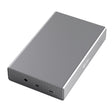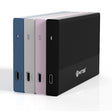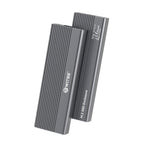



If you're looking for a hard drive enclosure, the first and most important question isn't which brand, but which size: 2.5-inch or 3.5-inch. That size determines whether your drive fits, whether you need a separate power adapter, and how much storage you can fit. This article puts the two side by side, so you know which one you need before you order.
How do you identify your drive's size?
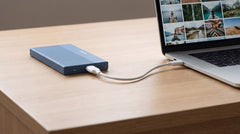
- 2.5-inch: flat and compact, usually from a laptop. Powered via the USB cable, no adapter needed.
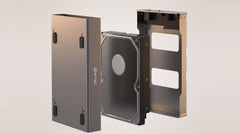
- 3.5-inch: larger and heavier, usually from a desktop PC. Needs its own power adapter.
Rule of thumb: if the drive came from a laptop, it's almost always 2.5-inch; if it came from a desktop tower, it's usually 3.5-inch.
Compare the two Switss enclosures
Prices and specifications below were checked on switss.nl on 22 July 2026. Check the product page for the current price.
| Switss 2.5" HDD/SSD Enclosure | Switss 3.5"/2.5" HDD/SSD Enclosure | |
|---|---|---|
| Suitable for | 2.5-inch SATA HDD and SSD | 3.5-inch and 2.5-inch SATA HDD and SSD |
| Connection | USB-C (USB 3.0, UASP) | USB 3.0 with UASP (USB-A) |
| Maximum speed | Up to 450 MB/s with SSD; 100-180 MB/s with HDD | Up to 400 MB/s read, 300 MB/s write with SSD |
| Maximum capacity | Up to 4 TB | Up to 20 TB |
| Power | Via the USB cable, no adapter needed | 2.5-inch: via USB cable. 3.5-inch: included power adapter required |
| Material | Aluminium with passive cooling | Aluminium with open cooling |
| Included cable | USB-C to USB-A | USB to USB-A |
| Colours | Black, silver, pink, blue | Space Grey |
| Price | €12,49 | €29,99 |
UASP (USB Attached SCSI Protocol) is a transfer protocol that sends data faster and more efficiently over USB than the older standard.
Which one fits your situation
- Only 2.5-inch drives, now and in the future? Choose the 2.5" enclosure: cheaper, more compact, no adapter needed.
- A 3.5-inch drive, or you want to use both sizes with one enclosure? Choose the 3.5"/2.5" combo: works with both sizes and up to 20 TB, at the cost of a larger enclosure and (for 3.5-inch drives) a power adapter.
Order several enclosures at once, for example for multiple old drives, and you automatically get 5% off from 2 units and 10% off from 10 units, applied in the cart.
Speed and capacity in practice
With the 2.5" enclosure and an SSD (up to 450 MB/s), a 10 GB film transfers in under 25 seconds; with a hard drive (100 to 180 MB/s), the same file takes about one to two minutes. The 3.5"/2.5" enclosure reaches up to 400 MB/s read and 300 MB/s write with an SSD: similarly fast, with the added benefit that it also fits 3.5-inch drives up to 20 TB, compared with 4 TB for the 2.5" enclosure.
What's in the box
Switss 2.5" HDD/SSD Enclosure:
- Enclosure
- USB-C to USB-A cable
- Quick start guide
- No drive included: your own 2.5-inch drive clicks in
Switss 3.5"/2.5" HDD/SSD Enclosure:
- Enclosure
- USB to USB-A cable
- Power adapter (for 3.5-inch drives)
- Quick start guide
- No drive included: fit your own 2.5-inch or 3.5-inch drive
More on your specific situation
If you specifically have a 2.5-inch laptop drive you'd like to give a second life, read Reusing an old 2.5-inch laptop drive as an external drive. If you want to know exactly how to connect a 3.5-inch desktop drive, with or without a power adapter, read Connecting a 3.5-inch desktop drive to your laptop (with or without power adapter). Not yet sure how to actually view the files on a loose drive before you order anything? The article "Reading an old hard drive: how to view the files on a standalone HDD or SSD" walks you through it step by step.
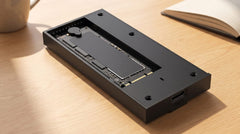
Could your drive be an M.2 SSD instead?
An M.2 SSD isn't a 2.5-inch or 3.5-inch drive, but a narrow circuit board that sits directly inside a laptop or motherboard. This enclosure won't fit it. Not sure which type of drive you have, or want to work through the full decision guide (size, connection, and USB speed)? Read Which enclosure do I need for my old hard drive?
Frequently asked questions
Does the 3.5"/2.5" enclosure also work without the power adapter?
Only for 2.5-inch drives: they get power directly through the USB cable. A 3.5-inch drive needs the included power adapter.
Can the 2.5-inch enclosure also take a 3.5-inch drive?
No. The 2.5" enclosure is only suitable for 2.5-inch drives. If you have a 3.5-inch drive (as well), choose the 3.5"/2.5" enclosure instead.
Is a drive included with the enclosure?
No, with neither of them. You fit your own 2.5-inch or 3.5-inch hard drive or SSD.
Does the enclosure work with both a hard drive and an SSD?
Yes. Both enclosures work with classic hard drives and SATA SSDs alike, from any brand.
How much warranty do I get?
3-year manufacturer's warranty, with Dutch customer service.
Next step
Do you know which size you need now? Check the specifications and current price: Switss 2.5" HDD/SSD Enclosure for a laptop drive, or Switss 3.5"/2.5" HDD/SSD Enclosure for a desktop drive or if you want to be able to use both sizes.