

The short answer: NVMe and SATA are both M.2 SSDs with exactly the same shape, but with different technology underneath. NVMe is much faster (internally around 3500 to 7000 MB per second) than SATA (around 550 MB per second). If you use the SSD externally in an enclosure, it is not the SSD but the USB port that determines your speed. Choose NVMe for heavy work, SATA is enough for budget and everyday use. A good enclosure works with both anyway.
M.2 is a shape, not a speed
This is the trap most people fall into: "M.2" only tells you something about the size and connector of the SSD, not about how fast it is. Within that same M.2 format there are two completely different types: NVMe and SATA. They look almost identical, but they work differently on the inside. That is what causes the confusion, and why we wrote this article.
NVMe: built for speed
NVMe (Non-Volatile Memory Express) communicates via the PCIe lanes of your computer, the same fast lane your graphics card uses. As a result, an NVMe SSD reaches internal speeds between 3500 MB per second (PCIe Gen 3) and 7000 MB per second (Gen 4), easily ten times faster than an old-fashioned hard drive. This is the logical choice if you move large files, edit in 4K, or simply do not want to wait around.
SATA M.2: fine and more affordable
A SATA M.2 SSD (sometimes called NGFF) uses the older SATA technology, with a ceiling around 550 MB per second. That is still a lot faster than a hard drive, and it is cheaper than NVMe. For documents, backups and everyday use you barely notice the difference, making it a solid, affordable choice.
External? Then the USB port calls the shots
Here is the most important point. If you put a fast NVMe drive into an external enclosure, you do not automatically get that full internal speed out of it. The USB port of the enclosure sets the maximum. For comparison: USB 3.2 Gen 2 does around 10 Gbps (about 1050 MB per second), USB4 or Thunderbolt around 40 Gbps (up to about 3000 MB per second), and SATA drives never exceed around 550 MB per second anyway.
| SSD type | Internal | Via USB 3.2 Gen 2 | Via USB4 / Thunderbolt |
|---|---|---|---|
| NVMe (PCIe) | 3500 to 7000 MB per second | up to around 1050 MB per second | up to around 3000 MB per second |
| SATA (NGFF) | up to around 550 MB per second | up to around 500 MB per second | up to around 500 MB per second |
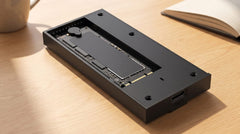
With the Switss® M.2 SSD enclosure (USB-C 3.2 Gen 2) you get up to around 1050 MB per second with an NVMe SSD, plenty for most people. If you want to squeeze the last bit of speed out of a fast NVMe drive, choose the Switss USB4 / Thunderbolt enclosure for up to around 3000 MB per second. A SATA drive stays around 500 MB per second either way, so you do not need an expensive USB4 enclosure for that.
How do I know what I have?
Two ways, both easy:
- Look at the notch in the gold contacts of the SSD. NVMe usually has one notch (M-key), SATA M.2 often has two (B+M-key).
- Read the product name or specs. Does it say NVMe or PCIe? Then it is NVMe. Does it say SATA? Then it is a SATA M.2.
Still not sure? No worries. All M.2 enclosures from Switss work with both, so you cannot buy the wrong one.
Which one should you choose?
- Choose NVMe if you move large files, edit video or simply want the fastest option.
- Choose SATA if budget matters more and you mainly use the drive for backups and documents.
Do you have two SSDs, or do you want extra security through RAID? Then take a look at the Switss RAID Dual-Bay enclosure, which has room for two drives at once.
Conclusion
NVMe and SATA share the same M.2 shape, but NVMe is much faster. If you use the drive externally, remember this one thing: your USB port determines the speed. For the best value, go for the Switss M.2 SSD enclosure, for maximum speed the USB4 / Thunderbolt enclosure. Both work with NVMe and SATA, so you never run into surprises. And with Dutch customer service, a 2 year warranty and a 30 day return policy, you can take your time to make the right choice.
Frequently asked questions
Does an NVMe SSD fit in every M.2 enclosure?
Not always. Some cheap enclosures only support SATA. All M.2 enclosures from Switss work with both NVMe and SATA, but with other brands it is worth checking the specifications first.
Is NVMe always worth the extra cost?
For heavy work, definitely. But in everyday use you barely notice the difference between 500 and 1050 MB per second, so SATA is a solid, more affordable choice then.
Can I reuse my old M.2 SSD from my laptop?
Yes. Put it in an external enclosure and you instantly have a fast, portable drive. Ideal after a laptop upgrade, whether it is NVMe or SATA.
Why do I not get the full NVMe speed out of my enclosure?
Because the USB port sets the upper limit. Via USB 3.2 Gen 2 you reach up to around 1050 MB per second, if you want to get closer to 3000 MB per second you need a USB4 or Thunderbolt enclosure.
Do I need an expensive USB4 enclosure for a SATA M.2?
No. A SATA drive never exceeds around 550 MB per second anyway, so a USB 3.2 Gen 2 enclosure already makes full use of that speed. USB4 gives no benefit here.